How to calculate weighted grades without the common mistakes
Reading time: 6 min · 6 sections

Three assignment percentages can average to 89.33% while their combined points give 88.82%. The difference is not a rounding error: you have changed what each assignment is worth.
How do I calculate weighted grades from a syllabus?
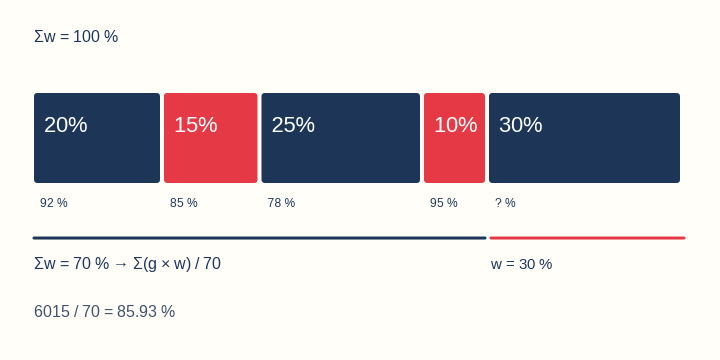
I write the course categories and their weights before entering individual scores. A weighted category system might allocate homework 20%, quizzes 15%, midterm 25%, labs 10% and final 30%. Each category first needs its own grade. Then multiply category grade by category weight, sum the products and divide by the total weight of the categories being averaged.
For homework 92, quizzes 85, midterm 78 and labs 95, the products are 1840, 1275, 1950 and 950. Their sum is 6015 and their weights add to 70. The current grade is 6015 ÷ 70 = 85.928571…%, shown as 85.93%. The final is still ungraded; excluding it and normalizing the completed work gives a current average rather than a forecast that assumes a zero.
The Current grade tab shows both the average and normalized contributions. Homework occupies 20/70 of the entered work, so its contribution is 92 × 20/70 = 26.285714 course-average points. The normalized shares add to one, and the contributions add to 85.928571. Writing “92 times 20 percent” beside 26.29 would be incorrect unless the normalization were also explained.
| Completed category | Grade | Weight | Grade × weight |
|---|---|---|---|
| Homework | 92 | 20 | 1840 |
| Quizzes | 85 | 15 | 1275 |
| Midterm | 78 | 25 | 1950 |
| Labs | 95 | 10 | 950 |
| Total | — | 70 | 6015 |
How do I calculate a grade in a points-based course?
For 18 out of 20, 45 out of 50 and 88 out of 100, total earned is 151 and total possible is 170. Divide 151 by 170 and multiply by one hundred: 88.823529…%. The individual percentages are 90, 90 and 88. Their ordinary mean is 89.333333…%, but that treats a twenty-point quiz as equally important as the hundred-point exam.
The points method is also a weighted mean of the assignment percentages, with possible points as the weights. The quiz’s weight is twenty, the test’s fifty and the exam’s one hundred. This equivalence helps explain the discrepancy, but entering earned and possible points is usually less error-prone than converting every row manually. Keep fractional earned points instead of rounding them before adding.
If a task awards 3.5 of five possible points, its score is 70%, not 3.5%. If extra credit produces 22 of twenty, its percentage is 110%. Whether an extra-credit task also increases the denominator is a policy question. Some systems add bonus earned points without possible points; others use an ordinary assignment with earned above possible. Do not represent a denominator-free bonus as a row with zero possible points in this calculator.
How do points work inside weighted categories?
A common hybrid first adds points inside each category and then weights the category percentages. Suppose the homework category contains the three scores just discussed, so it is 88.823529…%, and homework counts for 20% of the course. Its full-course contribution is 88.823529… × 0.20 = 17.764706 percentage points. Another category has its own denominator and its own course weight.
Adding all assignment points across categories would erase those category weights. Averaging all assignment percentages would erase both the weights and the possible-point differences. Work one level at a time: assignment earned/possible to category percent, category percent times category course share, then sum the full-course contributions. If only some categories are active, divide by their combined course share to report a current average.
The calculator supports the two component operations rather than pretending every gradebook has identical grouping rules. Calculate a category in Points mode, retain its unrounded total if available, then enter that percentage and its syllabus weight in Percent × weight mode. Keep a written record of the original totals so you can audit the conversion later instead of relying only on a copied two-decimal result.
What if my weights do not add up to 100%?
Weights below one hundred can be perfectly sensible for a current average if future categories have not been graded. They can also mean you forgot a category. I distinguish those cases by checking the syllabus, not by forcing the numbers to total one hundred. A weights sum of eighty makes the average divide by eighty; it does not secretly award twenty points or subtract an automatic twenty-percent penalty.
Weights above one hundred can be relative weights rather than percentages. Rows weighted two and one have a two-to-one influence and still produce a valid normalized average. But a remaining-course projection needs actual course shares totaling one hundred. The tool therefore allows a normalized grade with relative weights while warning about a mismatched projection.
An empty category is different from a graded category with a genuine zero. Excluding an empty category rescales the active weights; including a zero records work that earned nothing. A missing assignment might be ignored temporarily, counted as zero immediately, or counted only after a deadline. Only the gradebook policy can tell you which interpretation is correct. Do not replace every blank with zero merely to simplify the table.
Why does my grade differ from the portal?
First compare the underlying earned and possible points. A rounded assignment percent can hide fractional marks, and a manually typed average can lose them. Next inspect dropped lowest scores, replacement exams, late penalties and extra credit. Those rules change which numbers belong in the numerator or denominator. A simple average cannot reproduce them until the adjusted input set is correct.
Then check whether the portal is showing graded work only or all planned work. A future final counted as zero creates a projection rather than a current grade. Look for the category weight and whether an inactive category is being redistributed. Also confirm that transferred assignments have landed in the intended categories; the same raw score can have a different effect in a different category.
Use an extreme-value sanity check. In a positive-weight average, the result must lie between the smallest and largest included percentages, even if the largest exceeds one hundred through extra credit. If your result falls outside that range, inspect the arithmetic or the inputs. A course projection can be below the current average when future work is assumed low; that is a different calculation, not a violation of the weighted-average rule.
Which current grade should I use for a final calculation?
For the worked course, the remaining final share is 30%. Taking the unrounded current grade 6015/70 into the final formula, a goal of 90 requires 99.5% on the remaining work. A goal of 83 requires 76.166666…%. Those targets depend on the final having the entire remaining share; if projects also remain, you need a combined assumption for that work.
A final that sits inside a category has an effective course weight equal to category share times final share of category points. Read the final-exam guide before using the category weight directly. To interpret the resulting percentage as a letter, read the cutoff and GPA guide. Neither the percent average nor its letter automatically equals a semester GPA.
Common questions
Should I average assignment percentages?
Only if every assignment has equal influence. In a points class, add earned points and possible points separately before dividing.
Do blank categories count as zero?
That depends on the gradebook policy. An ungraded category and an assignment that earned zero are different inputs.
Can I use weights of two and one?
Yes, for a normalized two-to-one average. A remaining-course projection needs actual course percentage weights instead.