Grade calculator
Check your course average or find the final-exam score you need with the grade calculator.
Choose a calculation, replace the starting values with your grades, then press Calculate.
Enter one row per graded assignment or category. Use its course weight from the syllabus, such as 20 for 20%. Leave out ungraded work.
Final exam
Current grade must exclude the final. If the final sits inside a category, use its effective course weight.
Grade after the final
Fractional points lost are allowed. Questions must be a positive whole number; wrong cannot exceed the total.
Enter each course’s letter grade and credits. For this term only, leave previous GPA and credits at zero. Open Cumulative GPA to include earlier terms.
Cumulative GPA
Only GPA credits count. P/CR/W courses are excluded; institutions can use other exclusions.
Starting values shown — enter your own grades and calculate.
The arithmetic
Next: compare the weights with your syllabus, or choose Final exam to plan your target. Read the worked example
Match your syllabusA → F
These are examples of US grading conventions, not school rules. Edited cutoffs apply to all calculations.
Minimums are inclusive. The next higher cutoff is exclusive.
Saved on this browser
Saved summaries contain the result and calculation type. Clear them on a shared device.
Numbers stay in this browser. Save stores a short result locally, not a full gradebook.
How do I use the grade calculator?
Before trusting a grade calculator result, check whether your course adds points or weights categories. I start with that rule, then check whether the gradebook gives percentages or only letter grades. Those systems can give different answers from exactly the same assignments. The four tabs here keep current grades, final-exam goals, test grading and GPA together, while the shared scale keeps their letter labels consistent.
Start with the gradebook’s underlying numbers rather than its rounded headline. Enter category percentages with their course weights in Current grade, or switch to points earned and points possible. Final exam needs the current grade excluding the final. Test grader converts lost points into a percent, including partial credit. GPA multiplies each course’s grade points by its credits before adding a previous record.
The defaults are examples, not promises about your school. Percentages above 100 are accepted where extra credit makes them meaningful. Negative numbers, incomplete numeric pairs and invalid denominators produce an error. Completely empty rows are skipped. Each grade-system format keeps its own rows when you switch away and return. Calculation happens in your browser; Save keeps a short result locally only when you choose it.
How do I calculate my current weighted grade?
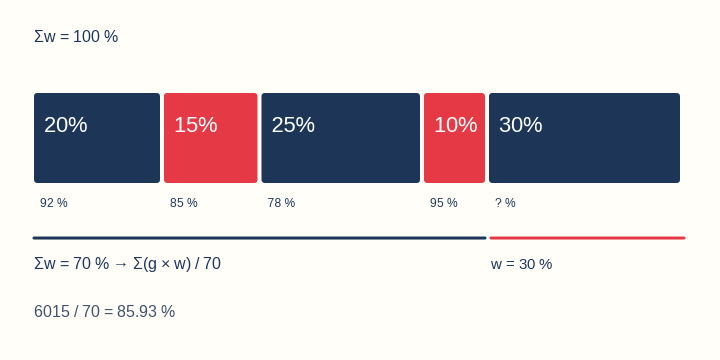
In a weighted course, multiply each category grade by its weight, add those products, then divide by the total weight entered. Homework at 92 with weight 20 contributes 1840 to the numerator. Quizzes at 85 with weight 15 contribute 1275; a midterm at 78 with weight 25 contributes 1950; labs at 95 with weight 10 contribute 950. The sum is 6015 and the entered weights total 70.
Your current average is therefore 6015 ÷ 70 = 85.928571…, shown as 85.93%. On the example scale it is a B. It does not mean the remaining 30% has earned a zero. The contribution chart normalizes each entered category by the same total, so its pieces add to the current grade. If a category is missing because nothing has been graded, leave it out rather than treating an empty field as a zero.
For a remaining-work projection, the entered course weights and the remaining weight must add to 100. The calculator initially suggests the unfilled share. You can change it if your syllabus says otherwise, but a mismatch stops that projection while leaving the normalized current average available. Read the weighted grades guide for category totals and gradebook discrepancies.
How do I calculate a grade from points?
A points course uses total earned ÷ total possible × 100. For 18/20, 45/50 and 88/100, the earned total is 151 and the possible total is 170. The result is 88.823529…, shown as 88.82%. Taking the mean of 90%, 90% and 88% gives 89.33%, which gives a small quiz as much influence as the hundred-point exam.
Enter earned and possible separately in Points mode. A fractional score such as 3.5 out of 5 stays fractional. An extra-credit score of 22 out of 20 becomes 110%; whether that belongs in your official calculation depends on the course. A zero possible total cannot supply a valid denominator. If your gradebook has weighted categories, calculate each category’s points percentage first, then use those percentages with the category weights.
What score do you need on the final?
Let c be the current grade, g the goal and w the final’s course weight as a fraction. The finished course grade is c × (1 − w) + final × w. Solving for the final gives (g − c × (1 − w)) ÷ w. With current 86%, goal 90% and a final worth 30%, the required score is (90 − 86 × 0.70) ÷ 0.30 = 99.333333…, shown as a minimum of 99.34% after rounding up. A score of 99.33% would leave the exact course total at 89.999%, just below the goal.
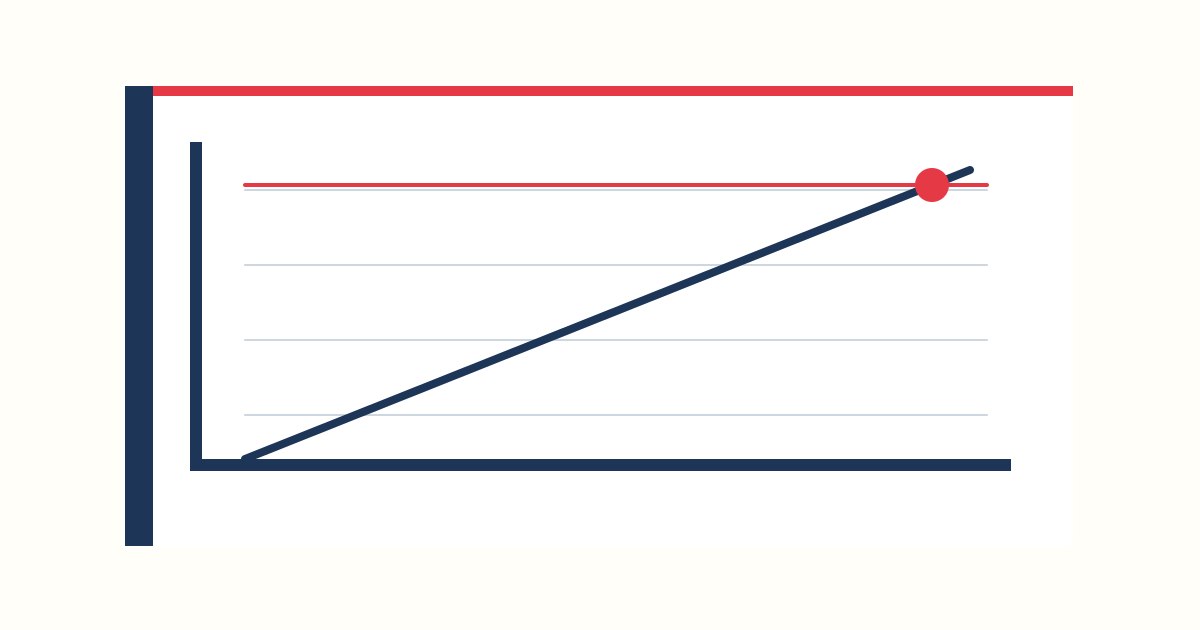
The result panel plots course grade against final score. Its dashed goal line and crossing point show why a small final may have limited influence. The outcome table gives the required final for every nonzero cutoff on your selected scale. It uses exact percentage targets without the optional rounding benefit for letters; positive displayed requirements are rounded up to the next 0.01% to meet the exact target. A needed score above 100 is beyond a 100% final; extra-credit or replacement rules would need a separate calculation. A nonpositive requirement is marked already secured rather than misleadingly assigning an F to the required final.
For the 85.928571… current average above and a 30% final, a goal of 90% requires 99.5%. A goal of 83% requires 76.17%. Conversely, current 100%, goal 70% and final weight 20% leave at least 80% even with zero on the exam. A zero-weight final cannot change the course grade. The final-exam guide explains finals inside categories and replacement policies. For your exact final score, open Grade after the final and enter the exam percentage. The result also shows the resulting course percentage and letter grade.
What percentage is each letter grade?
The shared scale begins with the example plus/minus intervals below, similar to the convention shown by Calculator.net. Change the preset to a simple ten-point A–F scale or edit the plus/minus minimums. A cutoff is inclusive: 93 belongs to A; a value below the next higher cutoff remains in the lower band. No table of integer ranges should leave 96.5% unexplained.
Letter assignment uses the percent displayed to two decimals. An optional setting then rounds that displayed percent to a whole number before selecting a letter. That means 89.50% becomes 90 for the letter, while the numeric result remains 89.50%. Your instructor may use another policy, so check it rather than assuming a calculator grants a rounding benefit. Letter inputs use the band minimum, not an invented midpoint.
| Letter | Percent interval | Example GPA points |
|---|---|---|
| A+ | 97 and above | 4.00 |
| A | 93 to < 97 | 4.00 |
| A- | 90 to < 93 | 3.70 |
| B+ | 87 to < 90 | 3.30 |
| B | 83 to < 87 | 3.00 |
| B- | 80 to < 83 | 2.70 |
| C+ | 77 to < 80 | 2.30 |
| C | 73 to < 77 | 2.00 |
| C- | 70 to < 73 | 1.70 |
| D+ | 67 to < 70 | 1.30 |
| D | 63 to < 67 | 1.00 |
| D- | 60 to < 63 | 0.70 |
| F | 0 to < 60 | 0.00 |
How do I calculate a test grade with partial credit?
For 25 equally weighted questions with three wrong, correct answers total 22. The percentage is 22 ÷ 25 × 100 = 88%, a B+ on the example scale. If questions carry different marks, enter total possible points as the total and points lost as wrong. Forty possible points with 2.5 lost gives 37.5 ÷ 40 × 100 = 93.75%.
The chart includes your entered fractional value and both endpoints. Large totals use a compact step size so a hundred-thousand-point input does not create a hundred-thousand-row page. More lost points than the total is rejected. A test percentage is only one assignment’s score; its effect on a course still depends on category and assignment weights.
How do I calculate semester and cumulative GPA?
A-, B+, B and A on courses worth four, three, four and three credits give 14.8 + 9.9 + 12 + 12 = 48.7 quality points. Divide by 14 credits to get 3.478571…, displayed as 3.48. With a previous 3.20 over 45 GPA credits, the combined result is (144 + 48.7) ÷ 59 = 3.266101…, displayed as 3.27. Averaging the two GPA numbers would disregard their very different credit totals. For a target cumulative GPA of 3.30 with those 45 previous credits and 14 new credits, this term must supply (3.30 × 59 − 144) ÷ 14 = 3.621428… GPA. The required minimum is shown as 3.63, rounded up rather than down. Previous GPA and credits start at zero in the tool; add your own history only when calculating a cumulative result.
The editor offers 3.7/3.3 and 3.67/3.33 point conventions, plus A+ as 4.0 or 4.3. P, CR and W are excluded from the GPA calculation here. For an institutional example, the University of Illinois registrar documents quality points, GPA hours and its truncation policy. This calculator rounds its display; it does not reproduce every registrar’s exclusions, repeat rules or transcript arithmetic.
Why does my grade differ from the gradebook?
I keep the numerator and denominator visible because a neat result can conceal the wrong model. Match a points total against earned and possible points; match category weights against the syllabus; use unrounded current grades for a final projection when they are available. A published curve should be applied before the affected grade is entered. The curve guide compares methods without pretending to choose your teacher’s policy.
The examples below show the inputs and results side by side. If a number disagrees with the gradebook, inspect the policy before changing inputs merely to make the display match. Your syllabus and registrar rules remain the final word.
| Case | Expected result |
|---|---|
| 18/20 + 45/50 + 88/100 | 88.82%, B+ |
| 90 × 2 plus 89.99 × 1 | 90.00%, A- |
| 86 current; 90 goal; 30% final | 99.34% needed |
| 40 possible; 2.5 lost | 93.75%, A |
| 48.7 quality points / 14 credits | 3.48 GPA |
Guides
 What do I need on my final? Work out the scoreTurn a course goal into a final-exam score, with bounds and category-weight checks.Reading time: 5 min
 How to calculate weighted grades without the common mistakesSeparate category weights from assignment points and track down a mismatched total.Reading time: 6 min
 Letter grade scales and GPA points: read the small printFollow a percentage into a letter, grade points and a credit-weighted GPA.Reading time: 6 min
 How grade curves work: four methods comparedSee how the same five scores change under four distinct grading policies.Reading time: 6 min
Common questions
Can I calculate grades without weights?
Choose Points mode if the course adds earned and possible points. Equal weights are suitable only when the course truly gives each entered score equal influence.
Why do weights below 100 still give a grade?
The calculator normalizes the entered weights to show an average of the work entered. The remaining-work projection requires entered and remaining course weights to total 100.
Can a needed final be negative?
Yes. A negative or zero requirement means the goal is secured at a final score of zero under the entered model. It is not a negative exam score.
Does 89.5 round to an A?
Only if your scale and rounding policy make that happen. Whole-percent rounding is optional; the default plus/minus example calls 90 an A-, not an A.
Are grades sent to a server?
No. Calculation runs in the browser. Explicitly saved summaries stay in local browser storage and can be cleared.
Updated · About this site